


Anova Culinary
3.26.24K Reviews
App Specs
- Version
- 3.6.6
- Updated On
- License
- Free
- Downloads
- 1,000,000+
- Developer
- Anova Applied Electronics, LLC
- Categories
- Food & Drink
- Platform
- Android
Screenshots
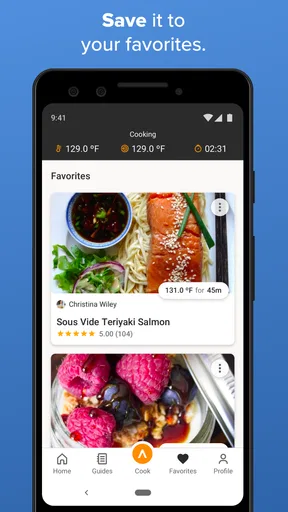
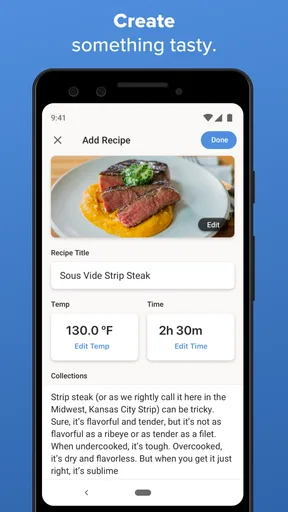
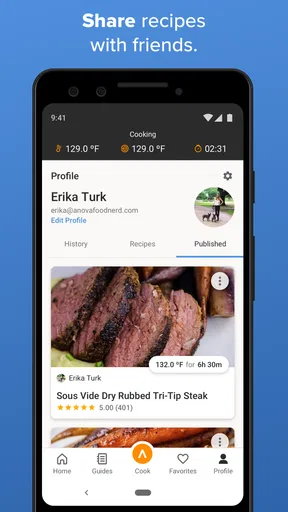
 Analysis by AppCompare
My first-week reaction to Anova Culinary was that it turns sous vide from a technique I kept meaning to try into a set of manageable steps. Instead of juggling a temperature guide, a recipe, and the controls on a cooker, I could use one place to find an idea and follow its instructions. That convenience is most persuasive when you are new to the method and unsure how much attention a dish needs.
The app is made by Anova Applied Electronics, Inc. and sits in the Food & Drink category. It is free to download, rated for Everyone, and has more than a million installs. Its average rating is 3.3 from around 28,000 ratings, which suggests that people’s experiences are mixed rather than universally glowing. Optional in-app purchases range from $1.99 to $9.99 per item, so I would check what is included before paying for anything.
What makes the first week useful
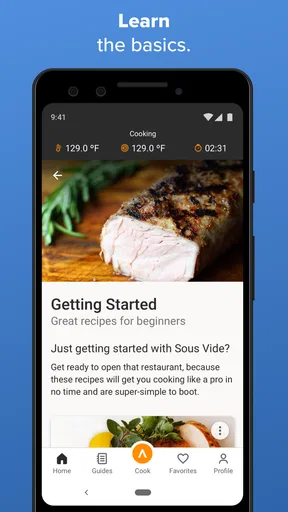
The first useful question is not simply “What should I cook?” but “What can I leave alone while I handle the rest of dinner?” Sous vide suits dishes where steady temperature and timing matter, and the app’s recipe-led guidance gives a beginner a concrete starting point. I would use it to plan one dish at a time, rather than treating the recipe catalog as a promise that every meal will be faster or simpler.
A realistic first-week dinner might be a steak planned around a side dish that needs the stove. The app can help set up the sous vide portion while I prepare the rest, reducing the need to watch a pan continuously. The trade-off is that sous vide is a different rhythm, not a shortcut in every situation: it asks for advance planning, and a finishing step may still be needed to get the surface browned. For a meal I decide on at the last minute, a pan or oven recipe may be the better fit.
Why it may earn a place in the routine
The lasting value depends on whether I cook this way often enough to benefit from dependable guidance. If a recipe helps me repeat a result I like, it can become more useful than browsing general recipe sites each time. I would save a small set of dependable meals—perhaps one protein, one vegetable, and one dish for guests—rather than endlessly collecting recipes I never make. That simple habit makes the app a practical reference instead of another source of kitchen inspiration that fades after a week.
It is also worth thinking about who does the cooking. A household that shares dinner duties may benefit from instructions that make a method easier to follow consistently. But if you mostly cook quick meals from whatever is already in the fridge, you may get more daily use from a broad recipe app or a basic timer. Anova’s focus is a strength when sous vide is part of your routine and a limitation when you want one app to cover every style of cooking.
Maintenance, attention, and small frictions
The app itself is only one part of the setup: sous vide also involves preparing food, arranging the cooking vessel, and cleaning up afterward. Those steps can feel like a lot for a single portion or a rushed weekday dinner. I would make the process easier by choosing recipes that share a cooking window, then handling several portions together when that suits the meal plan. That can make the setup effort feel worthwhile, though it is not a reason to cook more food than you need.
Worth Reading Before You Choose

EA SPORTS FC Mobile 26 Is a Bigger Football Game, but It Takes Time

Flipboard Shows What News Apps Must Do Beyond the Feed

Switching to Android Auto Means Rethinking Your Driving Routine

Google Calendar Makes a Crowded Week Easier to Manage

Ludo King Makes the Most of the Minutes Between Plans

Baby Panda World Brings Quick Play to Modern Phones, but Its Game Library Feels Busy
There is also a difference between following an app instruction and understanding the method. I would treat recipe times and temperatures as guidance for the particular dish, not as interchangeable settings for every cut or thickness. When I want to improvise, I would first check reliable guidance for that specific ingredient rather than assume that a setting from one recipe transfers neatly to another. That caution matters more than a polished interface: the app is a guide, not a substitute for sensible food handling.
Where it fits among cooking alternatives
Compared with ordinary recipe apps, Anova Culinary is more specialized: its appeal comes from helping people cook with Anova’s sous vide equipment, rather than offering a general-purpose plan for breakfasts, baking, and quick stovetop meals. A recipe website or cookbook may be more convenient when I want broad variety or do not own compatible equipment. A basic timer is simpler when I already know what I am cooking and only need to keep track of time.
The app makes the strongest case for itself when the recipe guidance and cooker controls belong in the same workflow. That can reduce fiddling at the start of a cook, but it also ties much of its practical value to using the Anova ecosystem. If you are deciding whether to buy a sous vide cooker, I would first ask how often you realistically expect to use the method; downloading the app alone will not make the equipment worthwhile.
For a new user, a useful approach is to choose one familiar ingredient and a recipe that leaves room to manage the rest of dinner. Follow the instructions, note what you liked, and repeat it before moving on to more ambitious experiments. If a result is not right, change one variable at a time rather than altering the temperature, timing, and finishing technique all at once. This is a low-effort way to learn what the method does well without turning dinner into a complicated test.
Whether you need an internet connection is a practical question when planning a cook. The published app information describes recipes and guides, but I would not build a meal plan around assuming every instruction will be available offline. If access matters in your kitchen, open the recipe before you start and make sure you can refer to what you need. Similarly, I would check the current app for the exact equipment support and any paid content before relying on a particular workflow.
People also ask whether the app is useful without an Anova cooker. I see its strongest purpose as helping with Anova sous vide cooking, so someone without that equipment may find a general recipe source more useful day to day. The app is free to try, but purchases are available within it; that makes it sensible to explore the free experience first and only spend if a specific paid item genuinely fills a need.
Getting Started with Anova Culinary
First things first, setting up the app is a breeze. Available for both Android and iOS, you can download it from the App Store or Google Play. Once installed, the app walks you through a simple pairing process with your Anova Precision Cooker. Trust me, even if tech isn't your thing, you'll find this straightforward. It’s like the app knows you’re itching to start cooking.
The User Interface
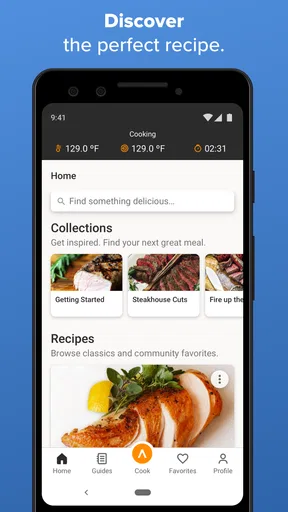
A clean and intuitive interface is what you get here. The home screen welcomes you with a variety of recipes categorized neatly, from meats and seafood to veggies and desserts. The search function is robust, letting you find recipes by ingredient or type, which is super handy when you’re staring at a fridge full of random items.
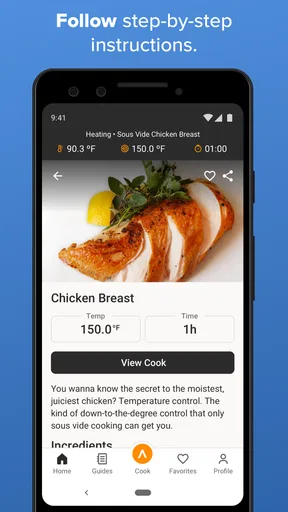
Each recipe comes with detailed instructions and tips. I love how the app provides both text and visual aids—it's like having a mini cooking show in your kitchen. Plus, the ability to adjust servings and cooking times is a lifesaver when you're cooking for two or a crew.
Features That Stand Out
One of my favorite features is the integration with the Anova Precision Cooker. Once you select a recipe, the app automatically sets the correct temperature and time for the cooker. It’s like having a personal chef whispering instructions in your ear.
Then there’s the notifications feature. Forget about constantly checking your food; the app will ping you when it’s time to flip or finish your meal. And let’s not forget the community aspect. You can share your culinary creations and get inspired by others, making it a social experience too.
Performance and Compatibility
In terms of performance, the app runs smoothly on most devices. I didn’t experience any lag or crashes, which is a big plus when you’re multitasking in the kitchen. The app also supports offline access to saved recipes, so you don’t need to worry about spotty Wi-Fi.
Compatibility-wise, it works seamlessly with all Anova Precision Cooker models. Whether you have the latest model or an older version, the app has got you covered. It’s like they thought of everything!
How long-term use feels
After the novelty of a new cooking method wears off, I judge the app by whether it helps me make repeatable meals without adding needless steps. The current version is 3.5.13, and the app has been available since April 28, 2015. Its age and continued presence make it a more established companion than a brand-new kitchen experiment, but the real test is still personal: do you reach for sous vide often enough to justify keeping a dedicated app in your routine?
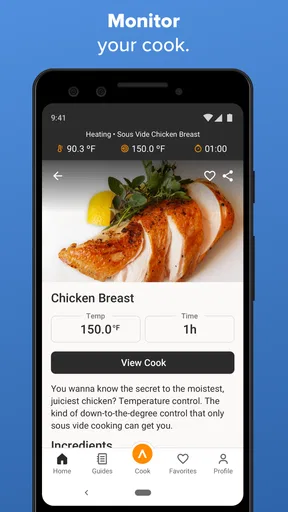
Notifications can be helpful when I am doing other kitchen tasks, but I would not treat them as a reason to walk away from the whole process. A reminder can return my attention to the cook; it cannot decide whether the food is ready for the finishing step or whether dinner timing has shifted. I would use alerts as a nudge, while keeping the recipe and the rest of the meal plan in view.
My other practical tip is to make the app earn its place through repetition. Save or revisit recipes you actually cook, and use notes outside the app if you want to remember personal tweaks that matter to your household. For example, a preferred browning method or a side dish that fits the same evening can be more useful to remember than a long list of recipes you sampled once. The point is to build a small, reliable repertoire rather than browse endlessly.
There are limits to that routine. A specialized app can feel like clutter if your cooking changes from week to week or if you prefer recipes that use the stove, oven, or air fryer. It may also be less convenient if you do not want to manage a cooker through a phone. In those cases, a printed recipe or a general-purpose cooking app may be a calmer choice, even if it offers less direct help with sous vide.
Final Thoughts
Overall, the Anova Culinary app is a game-changer for anyone interested in sous vide cooking. It removes the guesswork and elevates your cooking game with precision and ease. Whether you’re a seasoned chef or a curious beginner, this app is your ticket to culinary success.
If you’re ready to take the plunge into sous vide, give this app a try. You might just find yourself cooking restaurant-quality meals from the comfort of your home. Bon appétit!
My long-term verdict
I would recommend trying it if you already own an Anova Precision Cooker, enjoy following guided recipes, and expect to cook sous vide more than occasionally. The best reason to keep it is not novelty but consistency: a clear process can make a technique you once found intimidating easier to repeat. The weaker case is for someone who rarely plans meals ahead, prefers last-minute cooking, or wants one app to manage every kind of recipe.
Overall, Anova Culinary has a defined role rather than universal appeal. I like the way it connects recipe guidance with the sous vide workflow, and I would keep it if that method had a regular place in my kitchen. I would skip it as a general cooking companion if sous vide were only an occasional curiosity. That is the honest deciding point: the app can support a lasting habit, but it cannot create one on its own.
Pros
- User-friendly interface for easy navigation.
- Wide range of recipes included.
- Precise temperature control.
- Compatible with many devices.
- Supports remote cooking via Wi-Fi.
Cons
- Requires stable internet connection.
- Limited free recipes; many are paid.
- Initial setup can be complex.
- Some features need in-app purchases.
- Occasional connectivity issues.
FAQs for Anova Culinary
What is the Anova Culinary app used for?
The Anova Culinary app is designed to enhance your cooking experience by connecting with Anova Precision Cookers. It provides users with a wide range of recipes, step-by-step cooking instructions, and allows remote control of your sous vide device. Whether you're a beginner or a seasoned cook, the app aims to simplify your culinary adventures.
Is the Anova Culinary app compatible with all devices?
The Anova Culinary app is available for both Android and iOS devices. However, it's important to ensure your device meets the minimum operating system requirements specified in the app store. Compatibility with your Anova Precision Cooker model should also be verified to ensure optimal functionality.
Does the Anova Culinary app require an internet connection?
While the app can be used offline to some extent, an internet connection is necessary to access the full range of features, including downloading new recipes and updating the app. An active connection is also required for remote controlling your cooker and syncing any recipe changes.
Are there any costs associated with using the Anova Culinary app?
The Anova Culinary app itself is free to download and use. However, users should be aware that some features, such as premium recipes or additional content, might require in-app purchases. It's advisable to review any potential costs within the app's settings or app store description.
How user-friendly is the Anova Culinary app for beginners?
The Anova Culinary app is designed with user-friendliness in mind, offering an intuitive interface and comprehensive guides to assist beginners. It includes detailed recipes with step-by-step instructions and tips, making it accessible even to those new to sous vide cooking. The app also provides support and FAQs to help users navigate any challenges.


